 yichael
cb1d676629
init
yichael
cb1d676629
init
|
5 년 전 | |
|---|---|---|
| .. | ||
| dist | 5 년 전 | |
| doc | 5 년 전 | |
| example | 5 년 전 | |
| src | 5 년 전 | |
| test | 5 년 전 | |
| .babelrc | 5 년 전 | |
| .editorconfig | 5 년 전 | |
| CHANGELOG.md | 5 년 전 | |
| CHANGELOG_CN.md | 5 년 전 | |
| LICENSE | 5 년 전 | |
| README.md | 5 년 전 | |
| README_CN.md | 5 년 전 | |
| package.json | 5 년 전 | |
| webpack.config.js | 5 년 전 | |
README.md
English | 简体中文
vConsole

A lightweight, extendable front-end developer tool for mobile web page.
Features
- View console logs
- View network requests
- View document elements
- View Cookies, LocalStorage and SessionStorage
- Execute JS command manually
- Custom plugin
Usage
Download the latest release. (DO NOT copy dist/vconsole.min.js in the dev branch)
Or, install via npm:
npm install vconsole
Import dist/vconsole.min.js to your project:
<script src="path/to/vconsole.min.js"></script>
<script>
  // init vConsole
  var vConsole = new VConsole();
  console.log('Hello world');
</script>
For TypeScript users:
import 'path/to/vconsole.min.d.ts';
See Tutorial for more details.
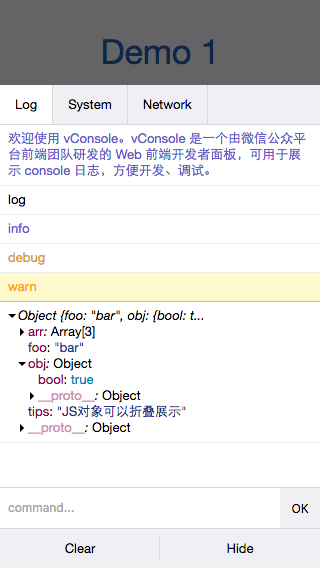
Preview

http://wechatfe.github.io/vconsole/demo.html
Documentation
vConsole:
Plugin:
Plugins
Changelog
Feedback
QQ Group: 497430533