| 123456789101112131415161718192021222324252627282930313233343536373839404142434445464748495051525354555657585960616263646566676869707172737475767778798081828384858687888990919293949596979899100101102103104105106107108109110111112113114115116117118119120121122123124125126127128129130131132133134135136137138139140141142143144145146147148149150151152153154155156157158159160161162163164165166167168169170171172173174175176177178179180181182183184185186187188189190191192193194195196197198199200201202203204205206207208209210211212213214215216217218219220221222223224225226227228229230231232233234235236237238239240241242243244245246247248249250251252253254255256257258259260261262263264265266267268269270271272273274275276277278279280281282283284285286287288289290291292293294295296297298299300301302303304305306307308309310311312313314315316317318319320321322323324325326327328329330331332333334335336337338339340341342343344345346347348349350351352353354355356357358359360361362363364365366367368369370371372373374375376377378379380381382383384385386387388389390391392393394395396397398399400401402403404 |
- Metadata-Version: 2.4
- Name: json_repair
- Version: 0.58.6
- Summary: A package to repair broken json strings
- Author-email: Stefano Baccianella <4247706+mangiucugna@users.noreply.github.com>
- License-Expression: MIT
- Project-URL: Homepage, https://github.com/mangiucugna/json_repair/
- Project-URL: Bug Tracker, https://github.com/mangiucugna/json_repair/issues
- Project-URL: Live demo, https://mangiucugna.github.io/json_repair/
- Keywords: JSON,REPAIR,LLM,PARSER
- Classifier: Programming Language :: Python :: 3
- Classifier: Operating System :: OS Independent
- Requires-Python: >=3.10
- Description-Content-Type: text/markdown
- License-File: LICENSE
- Provides-Extra: schema
- Requires-Dist: jsonschema>=4.21; extra == "schema"
- Requires-Dist: pydantic>=2; extra == "schema"
- Dynamic: license-file
- [](https://pypi.org/project/json-repair/)
- 
- [](https://pypi.org/project/json-repair/)
- [](https://pepy.tech/projects/json-repair)
- [](https://github.com/sponsors/mangiucugna)
- [](https://github.com/mangiucugna/json_repair/stargazers)
- English | [中文](README.zh.md)
- This simple package can be used to fix an invalid json string. To know all cases in which this package will work, check out the unit test.
- 
- ---
- # Think about sponsoring this library!
- This library is free for everyone and it's maintained and developed as a side project so, if you find this library useful for your work, consider becoming a sponsor via this link: https://github.com/sponsors/mangiucugna
- ## Premium sponsors
- - [Icana-AI](https://github.com/Icana-AI) Makers of CallCoach, the world's best Call Centre AI Coach. Visit [https://www.icana.ai/](https://www.icana.ai/)
- - [mjharte](https://github.com/mjharte)
- ---
- # Demo
- If you are unsure if this library will fix your specific problem, or simply want your json validated online, you can visit the demo site on GitHub pages: https://mangiucugna.github.io/json_repair/
- Or hear an [audio deepdive generate by Google's NotebookLM](https://notebooklm.google.com/notebook/05312bb3-f6f3-4e49-a99b-bd51db64520b/audio) for an introduction to the module
- ---
- # Motivation
- Some LLMs are a bit iffy when it comes to returning well formed JSON data, sometimes they skip a parentheses and sometimes they add some words in it, because that's what an LLM does.
- Luckily, the mistakes LLMs make are simple enough to be fixed without destroying the content.
- I searched for a lightweight python package that was able to reliably fix this problem but couldn't find any.
- *So I wrote one*
- # Supported use cases
- ### Fixing Syntax Errors in JSON
- - Missing quotes, misplaced commas, unescaped characters, and incomplete key-value pairs.
- - Missing quotation marks, improperly formatted values (true, false, null), and repairs corrupted key-value structures.
- ### Repairing Malformed JSON Arrays and Objects
- - Incomplete or broken arrays/objects by adding necessary elements (e.g., commas, brackets) or default values (null, "").
- - The library can process JSON that includes extra non-JSON characters like comments or improperly placed characters, cleaning them up while maintaining valid structure.
- ### Auto-Completion for Missing JSON Values
- - Automatically completes missing values in JSON fields with reasonable defaults (like empty strings or null), ensuring validity.
- # How to use
- Install the library with pip
- pip install json-repair
- then you can use use it in your code like this
- from json_repair import repair_json
- good_json_string = repair_json(bad_json_string)
- # If the string was super broken this will return an empty string
- You can use this library to completely replace `json.loads()`:
- import json_repair
- decoded_object = json_repair.loads(json_string)
- or just
- import json_repair
- decoded_object = json_repair.repair_json(json_string, return_objects=True)
- ### Avoid this antipattern
- Some users of this library adopt the following pattern:
- obj = {}
- try:
- obj = json.loads(string)
- except json.JSONDecodeError as e:
- obj = json_repair.loads(string)
- ...
- This is wasteful because `json_repair` will already verify for you if the JSON is valid, if you still want to do that then add `skip_json_loads=True` to the call as explained the section below.
- ### Read json from a file or file descriptor
- JSON repair provides also a drop-in replacement for `json.load()`:
- import json_repair
- try:
- file_descriptor = open(fname, 'rb')
- except OSError:
- ...
- with file_descriptor:
- decoded_object = json_repair.load(file_descriptor)
- and another method to read from a file:
- import json_repair
- try:
- decoded_object = json_repair.from_file(json_file)
- except OSError:
- ...
- except IOError:
- ...
- Keep in mind that the library will not catch any IO-related exception and those will need to be managed by you
- ### Non-Latin characters
- When working with non-Latin characters (such as Chinese, Japanese, or Korean), you need to pass `ensure_ascii=False` to `repair_json()` in order to preserve the non-Latin characters in the output.
- Here's an example using Chinese characters:
- repair_json("{'test_chinese_ascii':'统一码'}")
- will return
- {"test_chinese_ascii": "\u7edf\u4e00\u7801"}
- Instead passing `ensure_ascii=False`:
- repair_json("{'test_chinese_ascii':'统一码'}", ensure_ascii=False)
- will return
- {"test_chinese_ascii": "统一码"}
- ### JSON dumps parameters
- More in general, `repair_json` will accept all parameters that `json.dumps` accepts and just pass them through (for example indent)
- ### Performance considerations
- If you find this library too slow because is using `json.loads()` you can skip that by passing `skip_json_loads=True` to `repair_json`. Like:
- from json_repair import repair_json
- good_json_string = repair_json(bad_json_string, skip_json_loads=True)
- I made a choice of not using any fast json library to avoid having any external dependency, so that anybody can use it regardless of their stack.
- Some rules of thumb to use:
- - Setting `return_objects=True` will always be faster because the parser returns an object already and it doesn't have serialize that object to JSON
- - `skip_json_loads` is faster only if you 100% know that the string is not a valid JSON
- - If you are having issues with escaping pass the string as **raw** string like: `r"string with escaping\""`
- ### Strict mode
- By default `json_repair` does its best to “fix” input, even when the JSON is far from valid.
- In some scenarios you want the opposite behavior and need the parser to error out instead of repairing; pass `strict=True` to `repair_json`, `loads`, `load`, or `from_file` to enable that mode:
- ```
- from json_repair import repair_json
- repair_json(bad_json_string, strict=True)
- ```
- The CLI exposes the same behavior with `json_repair --strict input.json` (or piping data via stdin).
- In strict mode the parser raises `ValueError` as soon as it encounters structural issues such as duplicate keys, missing `:` separators, empty keys/values introduced by stray commas, multiple top-level elements, or other ambiguous constructs. This is useful when you just need validation with friendlier error messages while still benefiting from json_repair’s resilience elsewhere in your stack.
- Strict mode still honors `skip_json_loads=True`; combining them lets you skip the initial `json.loads` check but still enforce strict parsing rules.
- ### Schema-guided repairs
- Schema-guided repairs are currently considered in beta. Bugs are to be expected.
- You can guide repairs with a JSON Schema (or a Pydantic v2 model). When enabled, the parser will:
- - Fill missing values (defaults, required fields).
- - Coerce scalars where safe (e.g., `"1"` → `1` for integer fields, and `"yes"`/`"no"`/`1`/`0` for booleans).
- - Drop properties/items that the schema disallows.
- Schema mode can be selected with `schema_repair_mode`:
- - `standard` (default): existing schema-guided behavior.
- - `salvage`: includes `standard` and also:
- - drops invalid array items when individual items cannot be repaired;
- - maps arrays to objects by property order when schema/object shape is unambiguous.
- - unwraps a root single-item array to an object when the root schema expects an object (`[{...}] -> {...}`);
- - fills missing required fields only when a safe value can be inferred (`default`, `const`, first `enum`, or empty array/object when allowed by schema constraints).
- This is especially useful when you need deterministic, schema-valid outputs for downstream validation, storage, or typed processing. If the input cannot be repaired to satisfy the schema, `json_repair` raises `ValueError`.
- Install the optional dependencies:
- pip install 'json-repair[schema]'
- (For CLI usage, you can also use `pipx install 'json-repair[schema]'`.)
- When `schema` is provided, schema guidance is always applied (for both valid and invalid JSON). Schema guidance is mutually exclusive with `strict=True`.
- ```
- from json_repair import repair_json
- schema = {
- "type": "object",
- "properties": {"value": {"type": "integer"}},
- "required": ["value"],
- }
- repair_json('{"value": "1"}', schema=schema, return_objects=True)
- repair_json(
- '{"items":[{"id":1,"score":85.6},{"id":2,"score":"N/A"}]}',
- schema={
- "type": "object",
- "properties": {
- "items": {
- "type": "array",
- "items": {
- "type": "object",
- "properties": {"id": {"type": "integer"}, "score": {"type": "number"}},
- "required": ["id", "score"],
- },
- }
- },
- "required": ["items"],
- },
- schema_repair_mode="salvage",
- return_objects=True,
- )
- ```
- Pydantic v2 model example:
- ```
- from pydantic import BaseModel, Field
- from json_repair import repair_json
- class Payload(BaseModel):
- value: int
- tags: list[str] = Field(default_factory=list)
- repair_json(
- '{"value": "1", "tags": }',
- schema=Payload,
- skip_json_loads=True,
- return_objects=True,
- )
- ```
- ### Use json_repair with streaming
- Sometimes you are streaming some data and want to repair the JSON coming from it. Normally this won't work but you can pass `stream_stable` to `repair_json()` or `loads()` to make it work:
- ```
- stream_output = repair_json(stream_input, stream_stable=True)
- ```
- ### Use json_repair from CLI
- Install the library for command-line with:
- ```
- pipx install json-repair
- ```
- to know all options available:
- ```
- $ json_repair -h
- usage: json_repair [-h] [-i] [-o TARGET] [--ensure_ascii] [--indent INDENT]
- [--skip-json-loads] [--schema SCHEMA] [--schema-model MODEL]
- [--strict] [--schema-repair-mode {standard,salvage}] [filename]
- Repair and parse JSON files.
- positional arguments:
- filename The JSON file to repair (if omitted, reads from stdin)
- options:
- -h, --help show this help message and exit
- -i, --inline Replace the file inline instead of returning the output to stdout
- -o TARGET, --output TARGET
- If specified, the output will be written to TARGET filename instead of stdout
- --ensure_ascii Pass ensure_ascii=True to json.dumps()
- --indent INDENT Number of spaces for indentation (Default 2)
- --skip-json-loads Skip initial json.loads validation
- --schema SCHEMA Path to a JSON Schema file that guides repairs
- --schema-model MODEL Pydantic v2 model in 'module:ClassName' form that guides repairs
- --strict Raise on duplicate keys, missing separators, empty keys/values, and similar structural issues instead of repairing them
- --schema-repair-mode {standard,salvage}
- Schema repair mode: standard (default) or salvage (best-effort array/object salvage)
- ```
- ## Adding to requirements
- **Please pin this library only on the major version!**
- We use TDD and strict semantic versioning, there will be frequent updates and no breaking changes in minor and patch versions.
- To ensure that you only pin the major version of this library in your `requirements.txt`, specify the package name followed by the major version and a wildcard for minor and patch versions. For example:
- json_repair==0.*
- In this example, any version that starts with `0.` will be acceptable, allowing for updates on minor and patch versions.
- ---
- # How to cite
- If you are using this library in your academic work (as I know many folks are) please find the BibTex here:
- @software{Baccianella_JSON_Repair_-_2025,
- author = "Stefano {Baccianella}",
- month = "feb",
- title = "JSON Repair - A python module to repair invalid JSON, commonly used to parse the output of LLMs",
- url = "https://github.com/mangiucugna/json_repair",
- version = "0.39.1",
- year = 2025
- }
- Thank you for citing my work and please send me a link to the paper if you can!
- ---
- # How it works
- This module will parse the JSON file following the BNF definition:
- <json> ::= <primitive> | <container>
- <primitive> ::= <number> | <string> | <boolean>
- ; Where:
- ; <number> is a valid real number expressed in one of a number of given formats
- ; <string> is a string of valid characters enclosed in quotes
- ; <boolean> is one of the literal strings 'true', 'false', or 'null' (unquoted)
- <container> ::= <object> | <array>
- <array> ::= '[' [ <json> *(', ' <json>) ] ']' ; A sequence of JSON values separated by commas
- <object> ::= '{' [ <member> *(', ' <member>) ] '}' ; A sequence of 'members'
- <member> ::= <string> ': ' <json> ; A pair consisting of a name, and a JSON value
- If something is wrong (a missing parentheses or quotes for example) it will use a few simple heuristics to fix the JSON string:
- - Add the missing parentheses if the parser believes that the array or object should be closed
- - Quote strings or add missing single quotes
- - Adjust whitespaces and remove line breaks
- I am sure some corner cases will be missing, if you have examples please open an issue or even better push a PR
- # Contributing
- If you want to contribute, start with `CONTRIBUTING.md` and read the Code Wiki writeup for a tour of the codebase and key entry points: https://codewiki.google/github.com/mangiucugna/json_repair
- # How to develop
- Use `uv` to set up the dev environment and run tooling:
- uv sync --group dev
- uv run pre-commit run --all-files
- uv run pytest
- Make sure that the Github Actions running after pushing a new commit don't fail as well.
- # How to release
- You will need owner access to this repository
- - Edit `pyproject.toml` and update the version number appropriately using `semver` notation
- - **Commit and push all changes to the repository before continuing or the next steps will fail**
- - Run `python -m build`
- - Create a new release in Github, making sure to tag all the issues solved and contributors. Create the new tag, same as the one in the build configuration
- - Once the release is created, a new Github Actions workflow will start to publish on Pypi, make sure it didn't fail
- ## Docs demo API deployment (PythonAnywhere)
- - The docs site is deployed by GitHub Pages (`pages-build-deployment`).
- - After a successful Pages deployment on `main`, `.github/workflows/pythonanywhere-sync.yml` uploads `docs/app.py` to PythonAnywhere at `/home/mangiucugna/json_repair/app.py` and reloads `mangiucugna.pythonanywhere.com`.
- - Required repository Actions secret: PythonAnywhere API token (`PYTHONANYWHERE_API_TOKEN`).
- ---
- # Repair JSON in other programming languages
- - Typescript: https://github.com/josdejong/jsonrepair
- - Go: https://github.com/RealAlexandreAI/json-repair
- - Ruby: https://github.com/sashazykov/json-repair-rb
- - Rust: https://github.com/oramasearch/llm_json
- - R: https://github.com/cgxjdzz/jsonRepair
- - Java: https://github.com/du00cs/json-repairj
- ---
- ## Star History
- [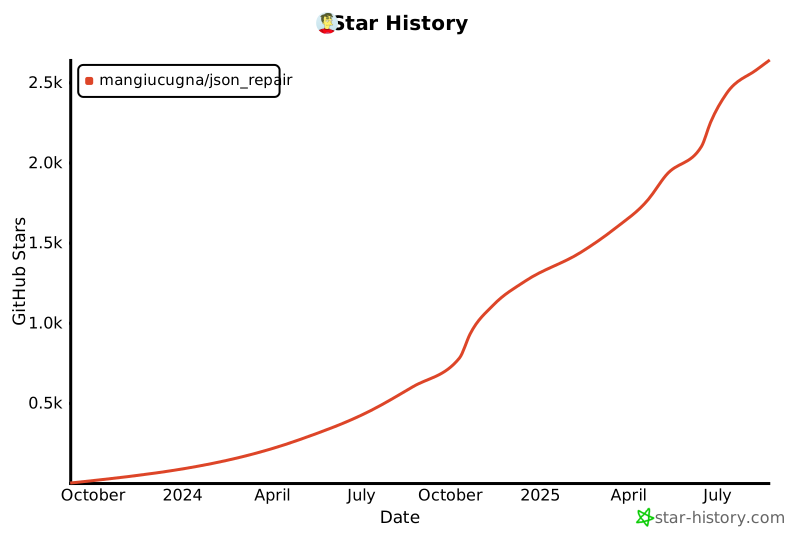](https://star-history.com/#mangiucugna/json_repair&Date)
|
