





📚 Documents: imagedl.readthedocs.io
🧪 Online API Health & Demo: charlespikachu.github.io/imagedl
Automatically runs daily checks on all registered imagedl modules (search + download)
via GitHub Actions and visualizes the latest results on this page.

学习收获更多有趣的内容, 欢迎关注微信公众号:Charles的皮卡丘
# 🆕 What's New
- 2026-03-04: Released pyimagedl v0.3.8 — added image search and download functionality for Weibo; integrated the cloudscraper library to better download certain restricted images; code optimizations and bug fixes.
- 2026-02-23: Released pyimagedl v0.3.7 — resolved underlying issues to restore reliable image search and download functionality across multiple supported platforms.
- 2026-02-12: Released pyimagedl v0.3.6 — added support for searching and downloading images from FreeNatureStock, and optimized other parts of the code.
# 📘 Introduction
Imagedl lets you search for and download images from specific websites. If you find it useful, please consider starring the repository to follow updates—thank you for your support!
# 🖼️ Supported Image Client
| ImageClient (EN) | ImageClient (CN) | Search | Download | Code Snippet |
| :----: | :----: | :----: | :----: | :----: |
| [BaiduImageClient](https://image.baidu.com/) | [百度图片](https://image.baidu.com/) | ✔️ | ✔️ | [baidu.py](https://github.com/CharlesPikachu/imagedl/blob/main/imagedl/modules/sources/baidu.py) |
| [BingImageClient](https://www.bing.com/images) | [必应图片](https://www.bing.com/images) | ✔️ | ✔️ | [bing.py](https://github.com/CharlesPikachu/imagedl/blob/main/imagedl/modules/sources/bing.py) |
| [DuckduckgoImageClient](https://duckduckgo.com/) | [DuckDuckGo图片](https://duckduckgo.com/) | ✔️ | ✔️ | [duckduckgo.py](https://github.com/CharlesPikachu/imagedl/blob/main/imagedl/modules/sources/duckduckgo.py) |
| [DanbooruImageClient](https://danbooru.donmai.us/) | [Danbooru动漫图片](https://danbooru.donmai.us/) | ✔️ | ✔️ | [danbooru.py](https://github.com/CharlesPikachu/imagedl/blob/main/imagedl/modules/sources/danbooru.py) |
| [DimTownImageClient](https://dimtown.com/home) | [次元小镇](https://dimtown.com/home) | ✔️ | ✔️ | [dimtown.py](https://github.com/CharlesPikachu/imagedl/blob/main/imagedl/modules/sources/dimtown.py) |
| [EverypixelImageClient](https://www.everypixel.com/) | [Everypixel](https://www.everypixel.com/) | ✔️ | ✔️ | [everypixel.py](https://github.com/CharlesPikachu/imagedl/blob/main/imagedl/modules/sources/everypixel.py) |
| [FoodiesfeedImageClient](https://www.foodiesfeed.com/) | [Foodiesfeed美食图片](https://www.foodiesfeed.com/) | ✔️ | ✔️ | [foodiesfeed.py](https://github.com/CharlesPikachu/imagedl/blob/main/imagedl/modules/sources/foodiesfeed.py) |
| [FreeNatureStockImageClient](https://freenaturestock.com/) | [FreeNatureStock自然图片](https://freenaturestock.com/) | ✔️ | ✔️ | [freenaturestock.py](https://github.com/CharlesPikachu/imagedl/blob/main/imagedl/modules/sources/freenaturestock.py) |
| [GoogleImageClient](https://images.google.com/) | [谷歌图片](https://images.google.com/) | ✔️ | ✔️ | [google.py](https://github.com/CharlesPikachu/imagedl/blob/main/imagedl/modules/sources/google.py) |
| [GelbooruImageClient](https://gelbooru.com/) | [Gelbooru动漫图片](https://gelbooru.com/) | ✔️ | ✔️ | [gelbooru.py](https://github.com/CharlesPikachu/imagedl/blob/main/imagedl/modules/sources/gelbooru.py) |
| [HuabanImageClient](https://huaban.com/) | [花瓣网](https://huaban.com/) | ✔️ | ✔️ | [huaban.py](https://github.com/CharlesPikachu/imagedl/blob/main/imagedl/modules/sources/huaban.py) |
| [I360ImageClient](https://image.so.com/) | [360图片](https://image.so.com/) | ✔️ | ✔️ | [i360.py](https://github.com/CharlesPikachu/imagedl/blob/main/imagedl/modules/sources/i360.py) |
| [PixabayImageClient](https://pixabay.com/zh/photos/) | [Pixabay高清图片](https://pixabay.com/zh/photos/) | ✔️ | ✔️ | [pixabay.py](https://github.com/CharlesPikachu/imagedl/blob/main/imagedl/modules/sources/pixabay.py) |
| [PexelsImageClient](https://www.pexels.com/zh-cn/) | [Pexels高清图片](https://www.pexels.com/zh-cn/) | ✔️ | ✔️ | [pexels.py](https://github.com/CharlesPikachu/imagedl/blob/main/imagedl/modules/sources/pexels.py) |
| [SogouImageClient](https://pic.sogou.com/) | [搜狗图片](https://pic.sogou.com/) | ✔️ | ✔️ | [sogou.py](https://github.com/CharlesPikachu/imagedl/blob/main/imagedl/modules/sources/sogou.py) |
| [SafebooruImageClient](https://safebooru.org/) | [Safebooru动漫图片](https://safebooru.org/) | ✔️ | ✔️ | [safebooru.py](https://github.com/CharlesPikachu/imagedl/blob/main/imagedl/modules/sources/safebooru.py) |
| [UnsplashImageClient](https://unsplash.com/) | [Unsplash图片](https://unsplash.com/) | ✔️ | ✔️ | [unsplash.py](https://github.com/CharlesPikachu/imagedl/blob/main/imagedl/modules/sources/unsplash.py) |
| [WeiboImageClient](https://m.weibo.cn/) | [微博图片](https://m.weibo.cn/) | ✔️ | ✔️ | [weibo.py](https://github.com/CharlesPikachu/imagedl/blob/main/imagedl/modules/sources/weibo.py) |
| [YandexImageClient](https://yandex.com/images/) | [Yandex图片](https://yandex.com/images/) | ✔️ | ✔️ | [yandex.py](https://github.com/CharlesPikachu/imagedl/blob/main/imagedl/modules/sources/yandex.py) |
| [YahooImageClient](https://images.search.yahoo.com/) | [雅虎图片](https://images.search.yahoo.com/) | ✔️ | ✔️ | [yahoo.py](https://github.com/CharlesPikachu/imagedl/blob/main/imagedl/modules/sources/yahoo.py) |
# 📦 Install
You have three installation methods to choose from,
```sh
# from pip
pip install pyimagedl
# from github repo method-1
pip install git+https://github.com/CharlesPikachu/imagedl.git@main
# from github repo method-2
git clone https://github.com/CharlesPikachu/imagedl.git
cd imagedl
python setup.py install
```
# ⚡ Quick Start
After installing imagedl, you can use the following few lines of code to quickly get started with it,
```python
from imagedl import imagedl
image_client = imagedl.ImageClient(image_source='BaiduImageClient')
image_client.startcmdui()
```
where `image_source` is used to specify the image search and download engine.
Of course, you can equivalently enter `imagedl -i "BaiduImageClient"` in the terminal to execute the above code.
`imagedl --help` displays the basic usage of the command-line tool.
```bash
Usage: imagedl [OPTIONS]
Options:
--version Show the version and exit.
-k, --keyword TEXT The keywords for the image search. If left
empty, an interactive terminal will open
automatically.
-i, --image-source, --image_source [bingimageclient|baiduimageclient|googleimageclient|
i360imageclient|pixabayimageclient|yandeximageclient|
duckduckgoimageclient|sogouimageclient|yahooimageclient|
unsplashimageclient|danbooruimageclient|safebooruimageclient|
gelbooruimageclient|pexelsimageclient|huabanimageclient|
foodiesfeedimageclient|everypixelimageclient|weiboimageclient|
freenaturestockimageclient]
The image search and download source.
[default: BaiduImageClient]
-s, --search-limits, --search_limits INTEGER RANGE
Scale of image downloads. [default: 1000;
1<=x<=100000000.0]
-n, --num-threadings, --num_threadings INTEGER RANGE
Number of threads used. [default: 5;
1<=x<=256]
-c, --init-image-client-cfg, --init_image_client_cfg TEXT
Client config such as `work_dir` as a JSON
string.
-r, --request-overrides, --request_overrides TEXT
Requests.get (or Requests.post) kwargs such
as `headers` and `proxies` as a JSON string.
--help Show this message and exit.
```
For class `imagedl.ImageClient`, the acceptable arguments include,
- `image_source` (`str`, default: `'BaiduImageClient'`): The image search and download source, including `['BaiduImageClient', 'BingImageClient', 'GoogleImageClient', 'I360ImageClient', 'PixabayImageClient', 'YandexImageClient', 'DuckduckgoImageClient', 'SogouImageClient', 'YahooImageClient', 'UnsplashImageClient', 'GelbooruImageClient', 'SafebooruImageClient', 'DanbooruImageClient', 'PexelsImageClient', 'DimTownImageClient', 'HuabanImageClient', 'FoodiesfeedImageClient', 'EverypixelImageClient', 'FreeNatureStockImageClient', 'WeiboImageClient']`.
- `init_image_client_cfg` (`dict`, default: `{}`): Client initialization configuration such as `{'work_dir': 'images', 'max_retries': 5}`.
- `search_limits` (`int`, default: `1000`): Scale of image downloads.
- `num_threadings` (`int`, default: `5`): Number of threads used.
- `request_overrides` (`dict`, default: `{}`): `requests.get` (or `requests.post`) kwargs such as `{'headers': {'User-Agent': xxx}, 'proxies': {}}`.
The demonstration is as follows,
If you just want to do an image search, you can also do it like this,
```python
from imagedl import imagedl
image_client = imagedl.ImageClient(image_source='DuckduckgoImageClient', search_limits=1000, num_threadings=5)
image_infos = image_client.search('cut animals', search_limits_overrides=10, num_threadings_overrides=1)
print(image_infos)
```
In the code above, `search_limits_overrides` overrides the `search_limits` argument set when initializing `imagedl.ImageClient`, and `num_threadings_overrides` works in the same way.
The output of this code looks like,
```python
[
{
"candidate_urls": [
"https://img.freepik.com/.../cut-animal-cartoon-bundle-set_508290-2349.jpg",
"https://tse2.mm.bing.net/th/id/OIP.vD-8G0MjAMREv1bYbKaqEwHaHa..."
],
"raw_data": {
"height": 626,
"width": 626,
"image": "https://img.freepik.com/.../cut-animal-cartoon-bundle-set_508290-2349.jpg",
"image_token": "fbff471d31328...",
"thumbnail": "https://tse2.mm.bing.net/th/id/OIP.vD-8G0MjAMREv1bYbKaqEwHaHa...",
"thumbnail_token": "4ca07ad2aab9...",
"source": "Bing",
"title": "Premium Vector | Cut animal cartoon bundle set",
"url": "https://www.freepik.com/premium-vector/cut-animal-cartoon-bundle-set_25750969.htm"
},
"identifier": "fbff471d31328...",
"work_dir": "imagedl_outputs\\DuckduckgoImageClient\\2025-11-16-22-34-25 cutanimals",
"file_path": "imagedl_outputs\\DuckduckgoImageClient\\2025-11-16-22-34-25 cutanimals\\00000001"
},
...
]
```
Then you can also call the image downloading function to download the images found by the search. The code is as follows,
```python
from imagedl import imagedl
image_client = imagedl.ImageClient(image_source='DuckduckgoImageClient', search_limits=1000, num_threadings=5)
image_infos = image_client.search('cut animals', search_limits_overrides=10, num_threadings_overrides=1)
image_client.download(image_infos=image_infos)
```
If you prefer not to use the unified interface, you can also import a specific image search engine directly, as in the following code,
```python
from imagedl.modules.sources import (
BingImageClient, I360ImageClient, YahooImageClient, BaiduImageClient, SogouImageClient, GoogleImageClient, YandexImageClient, PixabayImageClient,
DuckduckgoImageClient, UnsplashImageClient, GelbooruImageClient, SafebooruImageClient, DanbooruImageClient, PexelsImageClient, DimTownImageClient,
HuabanImageClient, FoodiesfeedImageClient, EverypixelImageClient, FreeNatureStockImageClient, WeiboImageClient
)
# bing tests
client = BingImageClient()
image_infos = client.search('Cute Dogs', search_limits=10, num_threadings=1)
client.download(image_infos, num_threadings=1)
# 360 tests
client = I360ImageClient()
image_infos = client.search('Cute Dogs', search_limits=10, num_threadings=1)
client.download(image_infos, num_threadings=1)
# baidu tests
client = BaiduImageClient()
image_infos = client.search('Cute Dogs', search_limits=10, num_threadings=1)
client.download(image_infos, num_threadings=1)
# sogou tests
client = SogouImageClient()
image_infos = client.search('Cute Dogs', search_limits=10, num_threadings=1)
client.download(image_infos, num_threadings=1)
# google tests
client = GoogleImageClient()
image_infos = client.search('Cute Dogs', search_limits=10, num_threadings=1)
client.download(image_infos, num_threadings=1)
# yandex tests
client = YandexImageClient()
image_infos = client.search('Cute Dogs', search_limits=10, num_threadings=1)
client.download(image_infos, num_threadings=1)
# pixabay tests
client = PixabayImageClient()
image_infos = client.search('Cute Dogs', search_limits=10, num_threadings=1)
client.download(image_infos, num_threadings=1)
# duckduckgo tests
client = DuckduckgoImageClient()
image_infos = client.search('Cute Dogs', search_limits=10, num_threadings=1)
client.download(image_infos, num_threadings=1)
# yahoo tests
client = YahooImageClient()
image_infos = client.search('Cute Dogs', search_limits=10, num_threadings=1)
client.download(image_infos, num_threadings=1)
# unsplash tests
client = UnsplashImageClient()
image_infos = client.search('Cute Dogs', search_limits=10, num_threadings=1)
client.download(image_infos, num_threadings=1)
# gelbooru tests
client = GelbooruImageClient()
image_infos = client.search('pikachu', search_limits=10, num_threadings=1)
client.download(image_infos, num_threadings=1)
# safebooru tests
client = SafebooruImageClient()
image_infos = client.search('pikachu', search_limits=10, num_threadings=1)
client.download(image_infos, num_threadings=1)
# danbooru tests
client = DanbooruImageClient()
image_infos = client.search('pikachu', search_limits=10, num_threadings=1)
client.download(image_infos, num_threadings=1)
# pexels tests
client = PexelsImageClient()
image_infos = client.search('animals', search_limits=10, num_threadings=1)
client.download(image_infos, num_threadings=1)
# dimtown tests
client = DimTownImageClient()
image_infos = client.search('JK', search_limits=10, num_threadings=1)
client.download(image_infos, num_threadings=1)
# huaban tests
client = HuabanImageClient()
image_infos = client.search('JK', search_limits=10, num_threadings=1)
client.download(image_infos, num_threadings=1)
# foodiesfeed tests
client = FoodiesfeedImageClient()
image_infos = client.search('pizza', search_limits=10, num_threadings=1)
client.download(image_infos, num_threadings=1)
# everypixel tests (cookies required)
client = EverypixelImageClient(default_search_cookies='xxxx')
image_infos = client.search('animals', search_limits=10, num_threadings=1)
client.download(image_infos, num_threadings=1)
# freenaturestock tests
client = FreeNatureStockImageClient()
image_infos = client.search('mountains', search_limits=10, num_threadings=1)
client.download(image_infos, num_threadings=1)
# weibo tests (cookies required)
client = WeiboImageClient(default_search_cookies='xxxx')
image_infos = client.search('animals', search_limits=10, num_threadings=1)
client.download(image_infos, num_threadings=1)
```
# 💡 Recommended Projects
| Project | ⭐ Stars | 📦 Version | ⏱ Last Update | 🛠 Repository |
| ------------- | --------- | ----------- | ---------------- | -------- |
| 🎵 **Musicdl**
轻量级无损音乐下载器 | [](https://github.com/CharlesPikachu/musicdl) | [](https://pypi.org/project/musicdl) | [](https://github.com/CharlesPikachu/musicdl/commits/master) | [🛠 Repository](https://github.com/CharlesPikachu/musicdl) |
| 🎬 **Videodl**
轻量级高清无水印视频下载器 | [](https://github.com/CharlesPikachu/videodl) | [](https://pypi.org/project/videofetch) | [](https://github.com/CharlesPikachu/videodl/commits/master) | [🛠 Repository](https://github.com/CharlesPikachu/videodl) |
| 🖼️ **Imagedl**
轻量级海量图片搜索下载器 | [](https://github.com/CharlesPikachu/imagedl) | [](https://pypi.org/project/pyimagedl) | [](https://github.com/CharlesPikachu/imagedl/commits/main) | [🛠 Repository](https://github.com/CharlesPikachu/imagedl) |
| 🌐 **FreeProxy**
全球海量高质量免费代理采集器 | [](https://github.com/CharlesPikachu/freeproxy) | [](https://pypi.org/project/pyfreeproxy) | [](https://github.com/CharlesPikachu/freeproxy/commits/master) | [🛠 Repository](https://github.com/CharlesPikachu/freeproxy) |
| 🌐 **MusicSquare**
简易音乐搜索下载和播放网页 | [](https://github.com/CharlesPikachu/musicsquare) | [](https://pypi.org/project/musicdl) | [](https://github.com/CharlesPikachu/musicsquare/commits/main) | [🛠 Repository](https://github.com/CharlesPikachu/musicsquare) |
| 🌐 **FreeGPTHub**
真正免费的GPT统一接口 | [](https://github.com/CharlesPikachu/FreeGPTHub) | [](https://pypi.org/project/freegpthub) | [](https://github.com/CharlesPikachu/FreeGPTHub/commits/main) | [🛠 Repository](https://github.com/CharlesPikachu/FreeGPTHub) |
# 📚 Citation
If you use this project in your research, please cite the repository.
```
@misc{imagedl2022,
author = {Zhenchao Jin},
title = {Imagedl: Search and download images from specific websites},
year = {2022},
publisher = {GitHub},
journal = {GitHub repository},
howpublished = {\url{https://github.com/CharlesPikachu/imagedl/}},
}
```
# 🌟 Star History
[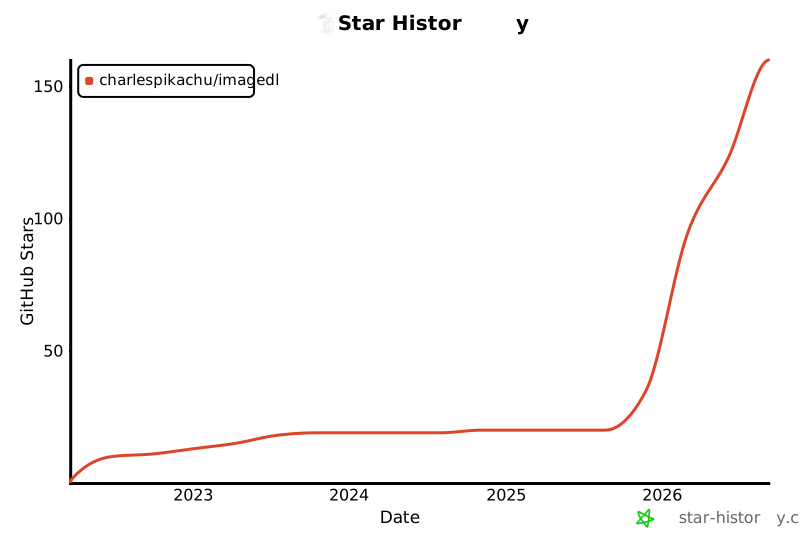](https://www.star-history.com/#CharlesPikachu/imagedl&type=date&legend=top-left)
# ☕ Appreciation (赞赏 / 打赏)
| WeChat Appreciation QR Code (微信赞赏码) | Alipay Appreciation QR Code (支付宝赞赏码) |
| :--------: | :----------: |
|  |
|  |
# 📱 WeChat Official Account (微信公众号):
Charles的皮卡丘 (*Charles_pikachu*)

|
# 📱 WeChat Official Account (微信公众号):
Charles的皮卡丘 (*Charles_pikachu*)